

Stay in the loop
Faster Claude Code agents in GitHub Actions
When Anthropic brought Claude Code to GitHub Actions, it took my favorite agentic coding interaction out of my terminal and into issues and pull requests.
We can ask Claude to write and run code by tagging @claude in a comment. Behind the scenes, it runs inside a GitHub Actions workflow that we control. That last part is what makes this interesting: we get to choose the machine that installs dependencies, runs tests, and builds the changes Claude makes.
Here's how to set up the current Claude Code action and run it on Depot GitHub Actions runners. We'll also look at Depot CI for running and debugging tests, and Managed Agents for working with Claude directly in a remote environment.
Configuring Claude Code in GitHub Actions
Start with the official Claude GitHub App. The quickest way to install it is to open claude in your repository and run:
/install-github-appYou'll need repository admin access and the GitHub CLI installed and authenticated with gh auth login. The setup connects the app to your repository, adds an authentication secret, and prepares a workflow pull request. Create and merge that PR before trying to tag Claude.
You can also install the app and add the workflow yourself. This example uses an Anthropic API key stored in the repository's ANTHROPIC_API_KEY Actions secret. Save it as .github/workflows/claude.yml:
name: Claude Code

on:
  issue_comment:
    types: [created]
  pull_request_review_comment:
    types: [created]

jobs:
  claude:
    if: contains(github.event.comment.body, '@claude')
    runs-on: ubuntu-latest
    timeout-minutes: 30
    permissions:
      contents: write
      pull-requests: write
      issues: write
      id-token: write
      actions: read
    steps:
      - name: Checkout repository
        uses: actions/checkout@v6
        with:
          fetch-depth: 1

      - name: Run Claude Code
        uses: anthropics/claude-code-action@v1
        with:
          anthropic_api_key: ${{ secrets.ANTHROPIC_API_KEY }}
          additional_permissions: |
actions: readThe if condition keeps unrelated comments from starting a runner. The write permissions let Claude push changes and respond on issues and PRs. id-token: write is required for the action's default GitHub App authentication, and actions: read allows access to CI results. The additional_permissions input requests that access for the app token too.
If you use a Claude subscription instead of an API key, create a token with claude setup-token, store it as the CLAUDE_CODE_OAUTH_TOKEN repository secret, and replace the anthropic_api_key input with:
claude_code_oauth_token: ${{ secrets.CLAUDE_CODE_OAUTH_TOKEN }}Updating an older workflow
If you set this up when the action was in beta, there's more to update than the version. Use anthropics/claude-code-action@v1, replace direct_prompt with prompt, and move CLI options into claude_args. The old allowed_tools input becomes --allowedTools inside claude_args. Don't copy the beta-era GitHub MCP tool names from an old workflow without checking whether the current action exposes them.
Anthropic keeps the full input mapping in its migration guide.
Turning Claude Code changes into a pull request
One of the things I'm most excited about is giving Claude a task and getting code back that I can review. With the default @claude workflow, Claude commits its changes to a new branch and replies with a link to create a pull request.
With the app installed and the workflow merged, comment on an issue with a specific request:
@claude implement the change described in this issue, run the relevant tests,
and prepare the changes on a branch for review.Keep your repository's build and test commands in CLAUDE.md so Claude doesn't have to guess how to check its work. When it's done, follow the link in Claude's response, review the diff, and create the PR yourself. Asking Claude to open a PR doesn't skip that step in the default interactive workflow. Anthropic documents this behavior in its PR creation guidance. Check the PR's CI results before merging, just as you would with any other PR.
Here's an example from our open-source docs repository, depot/docs:
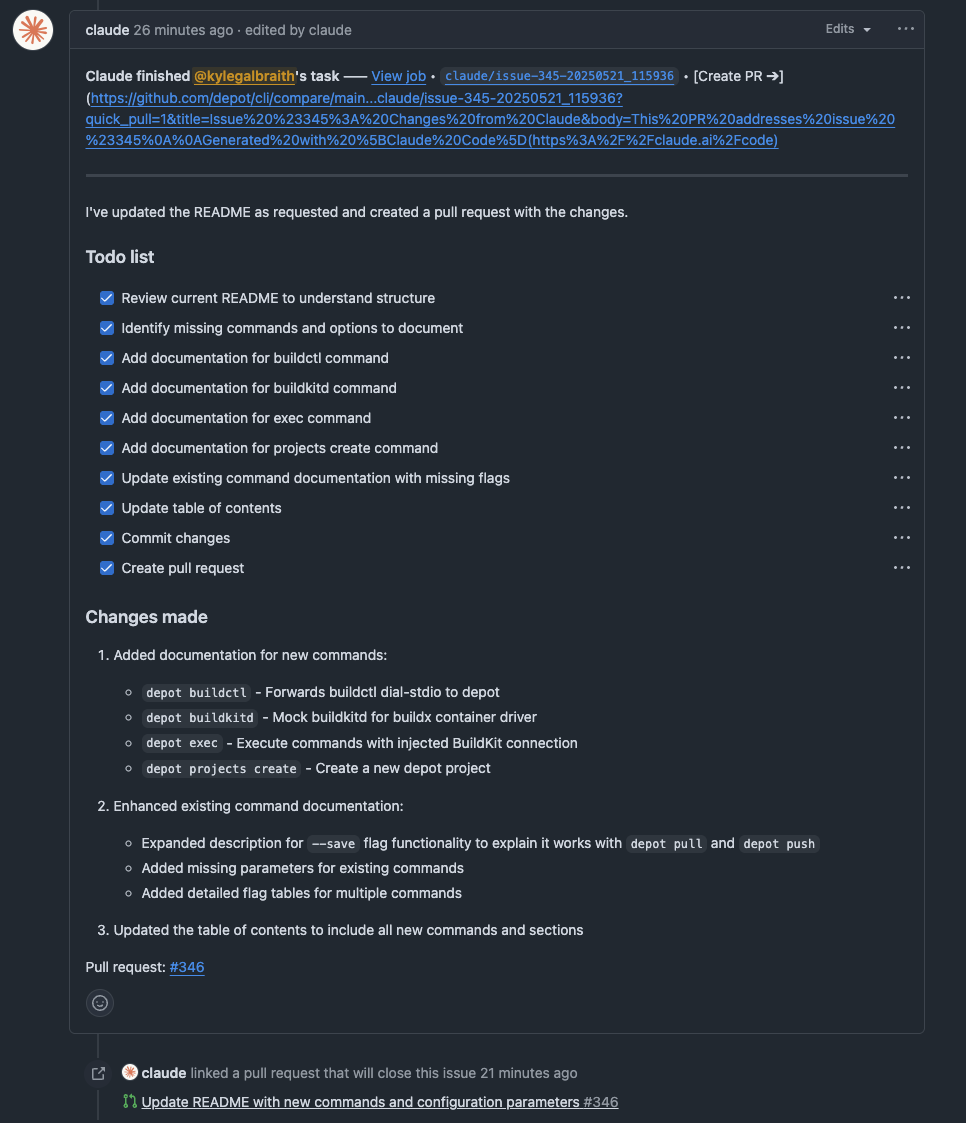
For a task that runs without an @claude comment, use a separate workflow with a workflow_dispatch or scheduled trigger and a prompt input. In that mode, grant the tools the task needs through claude_args or a skill's allowed tools. Anthropic's automation examples cover that setup.
When a run doesn't start or can't finish
If tagging Claude does nothing, first check that the app has access to the repository and the workflow is merged into the default branch. The example above listens for new comments; editing an existing comment doesn't trigger it.
If authentication fails, check that the secret name matches the input you're using. An API key goes in anthropic_api_key; a subscription token goes in claude_code_oauth_token. For permission errors, check both the workflow permissions and the app's repository access.
Keep the action's authorization checks enabled. Don't work around a failed fork PR by checking out untrusted code in a privileged pull_request_target job with credentials. See Anthropic's security guidance before changing who can trigger Claude or which tools it can use.
Speeding up Claude Code with Depot GitHub Actions runners
What's particularly cool about running Claude Code inside GitHub Actions is that you control where the agent runs. When Claude installs packages, runs tests, or compiles a project, it's doing real work on that machine. That's where faster compute and caching help.
We've built our GitHub Actions runners with an in-memory disk accelerator and integrated caching. To use them, connect your GitHub organization to Depot, then change the runner label in the workflow:
 jobs:
   claude:
-    runs-on: ubuntu-latest
+ runs-on: depot-ubuntu-24.04The Claude action, credentials, and triggers stay the same. GitHub still orchestrates this workflow; Depot runs the job.
Choose the runner size for the work Claude needs to do. An agent changing documentation has different requirements from one compiling a large application and running its test suite. Faster runners can shorten those commands; they don't make the model generate tokens faster.
For a concrete cost example, Depot's base 2-vCPU Linux runner has an additional-usage rate of $0.006 per minute. Five minutes of runner time comes to $0.03 at that rate, before included plan minutes. Claude API usage or subscription costs are separate. See current pricing for plan allowances and other runner sizes.
Give Claude a faster feedback loop with Depot CI
The machine running Claude is only part of the loop. Once it changes the code, it needs to run tests, read the failures, and try again. That's where Depot CI comes in.
Depot CI runs GitHub Actions YAML on its own orchestration engine. Jobs use pre-warmed sandboxes with Depot Cache built in, and you can use custom images with dependencies already installed. Those reduce the setup and build work between an agent making a change and getting a result.
Start with the Depot CI quickstart and use depot ci migrate to select your build and test workflows. It copies them into .depot/workflows/; import their secrets and variables as part of the setup. From an authenticated checkout, Claude can then run a migrated workflow against its uncommitted changes:
depot ci run --workflow .depot/workflows/ci.ymlUse your workflow's actual filename. Claude can inspect the result with depot ci status, read failures with depot ci logs, fix the code, and rerun. Jobs that check out the same repository receive the local changes, so the agent doesn't have to push a commit for every test attempt. The coding agent loop guide walks through that setup.
This gives the agent Depot CI for its build-and-test loop. The @claude comment workflow above remains a GitHub integration; migrating CI includes choosing triggers and authentication, not just changing runs-on.
Run full Claude Code sessions with Managed Agents
If you want to give Claude a task and keep working with it in the same conversation, use Depot Managed Agents. You start Claude Code from the web, desktop, or mobile app. Depot creates the sandbox and manages the runner, so the work can keep going after you close your laptop.
For Claude Code, connect a Claude self-hosted environment to Depot under Settings → Connections → Agent providers. Then choose that environment in Claude, select a repository, and send it a task. This requires a Claude Team or Enterprise plan with self-hosted environments enabled. The Claude Code setup guide covers the connection and GitHub access.
The agent loop and tools run on Depot compute, with automatic caching for supported build tools. You can choose the sandbox size and see run status, timing, and failures in Depot. Send a follow-up in the same Claude conversation to continue the work. When it needs a new sandbox, Depot restores the latest available workspace snapshot. That restores saved files, not running processes.
For comment-driven tasks, the GitHub Action gives you a familiar starting point. For an ongoing coding session, I'd start with Managed Agents and give Claude Depot CI to check its work.