Use Depot CI in coding agent loops
Depot CI is built for programmatic use, so it's a natural fit for AI coding agents. Instead of the usual push-wait-guess cycle, an agent can run CI locally, read the failure, fix the code, and rerun, all in a closed loop from your terminal.
This guide provides an example of how to set up that loop. The guide covers Claude Code and Cursor, but the pattern works for any agent with shell access.
The agent loop
You're working with an agent on a task, and you want to make sure CI passes before moving on or pushing your changes.
No human needs to approve each step. You tell the agent to fix CI, and the agent iterates until it's done.
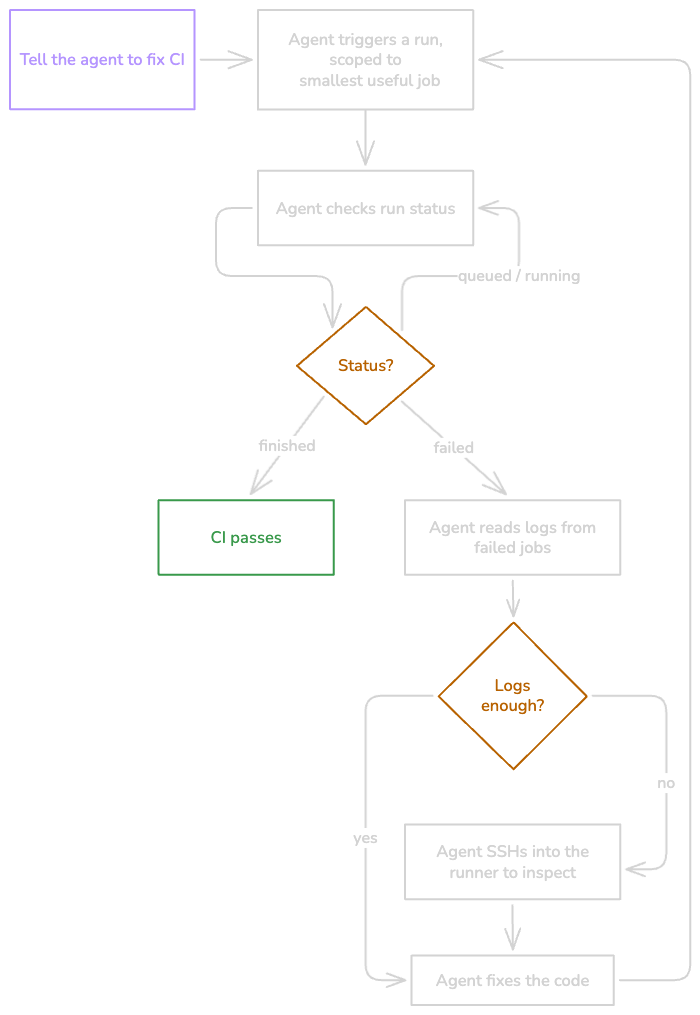
For a raw narrative version of this pattern, see the blog post The End of push-wait-guess CI. The guide you're reading right now includes updates to the available commands for agents that the linked post doesn't mention.
Why the CLI works well for agents
Most coding agents already have a shell. The Depot CLI gives them CI without any HTTP plumbing. depot ci run tests workflows against your local working tree without requiring a commit or push. That's what makes the agent loop work: the agent can edit code and rerun CI in a tight loop without polluting the git history or waiting on long-running CI in GitHub.
depot ci runstarts a run against your local working tree. Use--jobto scope to specific jobs for faster iteration. The CLI resolves job dependencies automatically.depot ci statusshows the full run hierarchy, workflows, jobs, and attempts with their statuses.depot ci logsfetches the log output for a failed job so the agent can read the error and fix it.depot ci diagnosegroups the failures for a run, workflow, job, or attempt and returns a diagnosis, a possible fix, and the evidence lines behind them. With--output json, the agent gets a bounded payload plusnext_commandsfor drilling into a narrower target, instead of parsing raw logs. The diagnosis is AI-generated, so always verify suggested fixes.depot ci sshconnects directly to a running sandbox via the Depot API, giving you (or the agent) an interactive shell on the sandbox. To keep a sandbox alive at the right moment, usedepot ci run --ssh-after-step <n>to inject a tmate debug pause after a specific step, then connect withdepot ci sshor the tmate connection string from the logs.
If your agent or tooling integrates over HTTP instead of a shell, the Depot CI API exposes the same operations: dispatching workflows, checking run status, fetching logs and metrics, and retrying jobs.
Prerequisites
- Complete the Depot CI quickstart.
- Run
depot loginor setDEPOT_TOKENso the agent can authenticate. - An AI coding agent with shell access (such as Claude Code or Cursor).
Install the Depot skills
Install Depot skills to teach your agent how to get started with Depot and use all the Depot CLI commands for Depot CI.
To install Depot skills with skills.sh, run npx skills add depot/skills.
Set up the fix CI loop command
With the skills installed, create a command that tells the agent to use them, defines the loop, and sets the boundaries for what the agent can do autonomously.
The example command for this guide is /fix-ci.
Add a markdown file that defines the command to your repo. For example, in .claude/commands/ or .cursor/commands/.
Example fix-ci.md:
Fix a Depot CI workflow, run, or job until it is green.

### Before you start

Invoke the `depot-ci` skill to load the full CLI reference. Then drive the debug loop.

### Inputs

Accept any of:

- a workflow path (for example, `.depot/workflows/ci.yml`)
- a run ID, job ID, or attempt ID
- a target job name (for example, `build`)
- a natural-language goal (for example, "make the test job pass")

If the request is ambiguous, ask for the narrowest useful target.

### The Loop

1. **Run** the workflow against local changes, scoped to the smallest useful job.
2. **Check status**, then **read the diagnosis** for any failed jobs using `depot ci diagnose` pointed at a failed job or attempt. The command groups similar failures and returns each group's error message, a possible fix, and the evidence lines behind them. It reports "No CI failures found for this target" when there's no stored failure evidence. Verify anything it suggests against the logs before acting on it.
3. **Read logs** for the failed jobs when the diagnosis isn't specific enough.
4. If logs aren't enough, connect to the running sandbox with **`depot ci ssh`**, or **rerun with `--ssh-after-step`** to pause at a specific step first.
5. **Fix locally** based on what you found.
6. **Rerun.** Repeat until green.

### Autonomy

The agent may: run workflows, inspect status/logs, SSH into sandboxes, edit local files, and rerun until green.

Ask before: changing secrets or vars, altering deploy or release behavior, opening a PR, or large refactors beyond the immediate fix.

### When done, report

- what was targeted
- what was wrong
- what changed
- proof of green (or the exact remaining blocker)The key ingredients are the same for any agent: install the skill so the agent has the CLI reference, then give it a command or prompt that describes the run-status-logs-ssh loop and the autonomy boundaries.
Give the agent permission to run the loop
For the agent to iterate autonomously, it needs permission to run depot commands without prompting. How you configure permissions depends on your agent. Here are some examples.
Claude Code permissions
Add a permission rule to .claude/settings.json to allow any Depot command:
{
  "permissions": {
    "allow": ["Bash(depot *)"]
  }
}Cursor permissions
Add a permission rule to <project>/.cursor/cli.json to allow any Depot command:
{
  "permissions": {
    "allow": ["Shell(depot)"]
  }
}Run the agent loop
Type /fix-ci .depot/workflows/ci.yml (for example) in your agent chat and watch the agent take over. You can adjust your custom command using the tips in the following section.
Tips for customizing your agent loop
Iteration limits
Cap the number of CI attempts so the agent doesn't loop forever on a fundamentally broken build. Three to five attempts is a reasonable default.
Log truncation
CI logs can be long. If your agent has a limited context window, truncate logs to the last N lines or extract just the error output. Most failures surface near the end of the log. You can also start with depot ci diagnose --output json, which returns bounded failure context (capped groups, representative attempts, and evidence lines) rather than the full log, and use depot ci logs only when the agent needs more.
Polling
depot ci status returns immediately. It doesn't block until the run finishes. Agents will naturally poll by calling the status command in a loop. This works fine in practice.
Human approval gates
If the agent shouldn't take certain actions autonomously, configure your agent's permission model to require approval for those commands. The /fix-ci command definition in the example includes suggested boundaries: the agent can run workflows, read logs, SSH in, and edit code, but should ask before changing secrets, deploying, or opening PRs.
Untracked files aren't patched
depot ci run only includes tracked files in the local patch. If you've added a new file, use git add before running the agent, or add that step to your agent loop.
What's next
The pattern in this guide is one way to implement a coding agent loop that uses Depot CI to iterate locally. Experiment with skills or sub agents or a mixture of these to create patterns that work for you. You can create more custom commands for managing or monitoring workflows with Depot CI. Learn more about the Depot CI CLI commands that your agents can use, or build directly against the Depot CI API.